SciENcv Update Impacting Proposals & RPPRs
Friday, September 25, 2026
Sponsored Research (SR) has been made aware of an update to SciENcv that will impact both proposals and RPPRs being submitted after today.
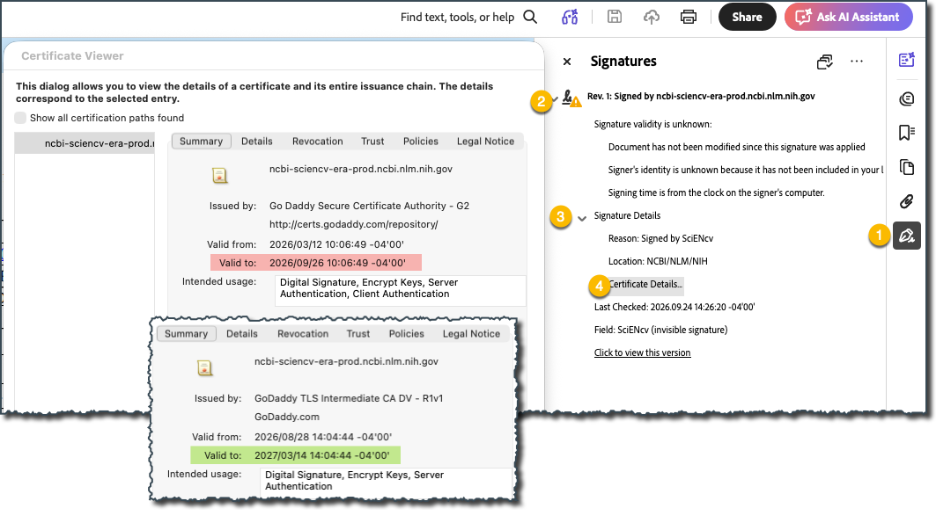
On or about 9/19/26, SciENcv updated the certificate used to electronically certify biographical sketches and CPOS common form documents. The previous certificate expires tomorrow (9/26/26). Note, the form itself is not changing; only the website certification.
If a biosketch or Other Support document was certified before 9/19/26 it used the old certificate and will fail validation. Therefore, a new version must be certified.
This is unfortunate timing so close to the R01 deadline. However, SR will do its best to assist with making necessary corrections to ensure all proposals are submitted on time and without error.
For S2S proposals/RPPRs not yet routed to SR, please ask the PI to re-certify their documents as soon as possible. Do not release a S2S proposal in CERES without confirming the correct version is used. (See instructions below for checking.)
For S2S proposals/RPPRs already with SR for review, we will conduct our standard review but return the record for the insertion of the newly-certified documents prior to submission.
For any S2S proposals that have already been submitted, check the errors/warnings in Commons carefully. Consult with the Pre-Award team member who reviewed the proposal if you believe a Changed/Corrected application is needed.
For subaward proposals or RPPRs already reviewed by SR, you may provide updated documents directly to the pass-through entity; SR does not review these or need to reopen a CERES record to capture this change.
As always, continue to run all available validations prior to routing a record or report to SR, to avoid unnecessary sendbacks and delays.
- To check whether you are using a new version:
- Open the Biosketch PDF in Adobe Acrobat.
- Look for the certification panel. It may appear as a blue/gray signature bar at the top or under the left-side Signatures panel.
- Click Certificate Details.